|
|
|
|
|
|
|
|
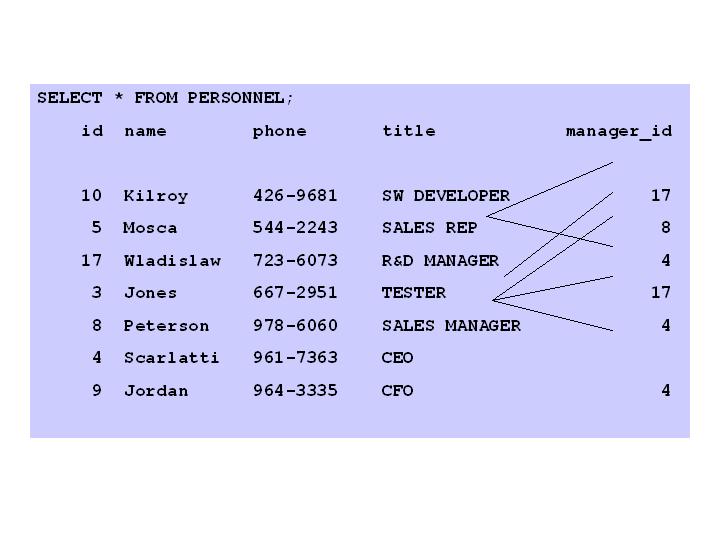
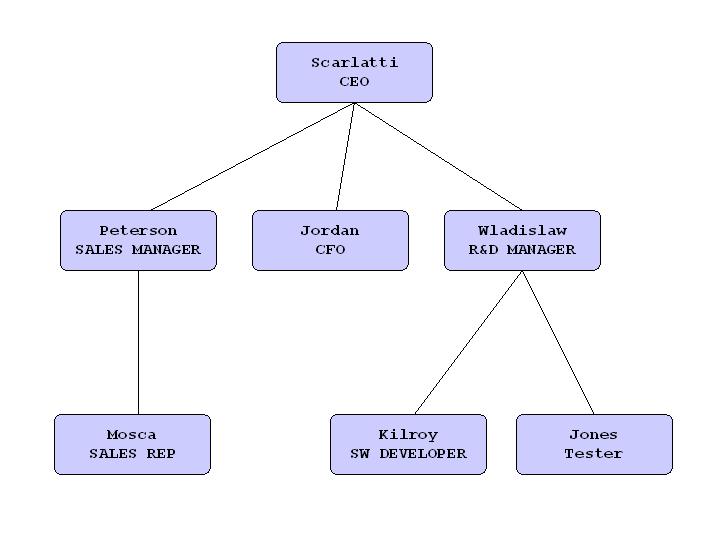
Empress Technical News – September 2009 Empress Hierarchical Query IntroductionEmpress Ultra Embedded 10.20 offers many useful features forapplication developers. One of those features is the Empress Hierarchical Query. Empress Hierarchical QueryA standard relational database does not store data in a hierarchical way. How can you get data from a relational database in a hierarchical manner? The new Empress Hierarchical Query feature is the answer. Empress has extended its relational data management system to satisfy data retrievals that better reflect real world requirements. In many cases, these real world requirements deal with data that is hierarchical in nature. Performing those retrievals in the most efficient and natural manner has been an objective of many database application developers. Empress Hierarchical Query is an extension of a self-join and works on a single table that contains data in a virtual hierarchical data structure. An example of a hierarchical structure is a company organizational chart. We will use the sample personnel table data from the Empress User’s Manual and add title and manager_id attributes in order to make a hierarchical structure. The personnel table is given in the Figure 1. Its hierarchical representation is shown in the Figure 2.
Figure 1. personnel table data
Figure 2. A hierarchical representation of the personnel table (organizational chart) If a table containshierarchical data, you can retrieve table records in a hierarchical order using the following clauses: START WITH – You can specify the starting root record of the hierarchy using this clause. CONNECT BY – You can specify the relationship between parent records and child records of the hierarchy using this clause. WHERE – You can restrict the records returned by the query without affecting other records of the hierarchy using this clause.
A simplified SELECT syntax that includes support for the hierarchical queries is as follows:
SELECT … FROM … [ WHERE_CLAUSE ] [ START WITH start_with_condition ] CONNECT BY connect_condition [ SORT_CLAUSE ]
Empress uses the information in these clauses to form a hierarchy by doing the following steps: 1. Empress selects the root record(s) of the hierarchy. These are the records that satisfy the condition start_with_condition. 2. Empress selects the child records of each root record. Each child record must satisfy the condition connect_condition with respect to one of the root records. 3. Empress selects successive generation of the child records. Empress first selects the children of the records returned by step 2, and then the children of those children, and so on. Empress always selects children by evaluating the connect_condition with respect to a current parent record. 4. If the query contains a WHERE_CLAUSE, Empress removes all records from the hierarchy that do not satisfy the condition of the WHERE_CLAUSE. Empress evaluates the condition for each record individually, rather than removing all the children of a record that doesn't satisfy the condition. start_with_condition the record(s) to be used as the root(s) of a hierarchical query. The clause specifies a condition that the roots must satisfy. If you omit this clause, Empress will use all records in the table as root records. connect_condition specifies the relationship between parent and child records in a hierarchical query. This clause contains a condition that defines this relationship. connect_condition includes the PRIOR operator that must have one of these forms: PRIOR expr comparison_operator expr expr comparison_operator PRIOR expr The connect_condition contain other conditions to further filter the records by the query. In the following example we are going to create table personnel, populate it with data and execute several retrieval commands utilizing Empress Hierarchical Query SQL> CREATE personnel (id SMALLINT, name CHAR (10), phone CHAR (10), title CHAR (15), manager_id SMALLINT) SQL> INSERT INTO personnel (id, name, phone, title, manager_id) VALUES ( 10," Kilroy" ," 426-9681" ," SW DEVELOPER" ,17, 5," Mosca" ," 544-2243" ," SALES REP" ,8, 17," Wladislaw" ," 723-6073" ," R& D MANAGER" ,4, 3," Jones" ," 667-2951" ," TESTER" ,17, 8," Peterson" ," 978-6060" ," SALES MANAGER" ,4, 4," Scarlatti" ," 961-7363" ," CEO" ,NULL, 9," Jordan" ," 964-3335" ," CFO" ,4 ) The following commandselects all the records from the table SQL> SELECT * FROM PERSONNEL id name phone manager_id 10 Kilroy 426-9681 SW DEVELOPER 17 5 Mosca 544-2243 SALES REP 8 17 Wladislaw 723-6073 R& D MANAGER 3 Jones 667-2951 TESTER 8 Peterson 978-6060 SALES MANAGER 4 4 Scarlatti 961-7363 CEO 9 Jordan 964-3335 CFO 4
The following command selects all the records from the table personnel in the hierarchical manner starting with the record that has title equal to “CEO”.
SQL> SELECT * FROM personnel START WITH title=" CEO" CONNECT BY PRIOR id=manager_id id name phone manager_id 4 Scarlatti 961-7363 CEO 17 Wladislaw 723-6073 R& D MANAGER 10 Kilroy 426-9681 SW DEVELOPER 17 3 Jones 667-2951 TESTER 17 8 Peterson 978-6060 SALES MANAGER 4 5 Mosca 544-2243 SALES REP 8 9 Jordan 964-3335 CFO The following command selects all the records from the table personnel in the hierarchical manner starting with the record that has title equal to “SALES MANAGER”. SQL> SELECT * FROM personnel START WITH title=" SALES MANAGER" CONNECT BY PRIOR id=manager_id id name phone title manager_id 8 Peterson 978-6060 SALES MANAGER 4 5 Mosca 544-2243 SALES REP 8 The following command selects all the records from the table personnel in the hierarchical manner using only two levels of hierarchy and starting with the record that has title equal to “CEO”. In order to specify only two levels of hierarchy a pseudo column LEVEL is used (i.e. LEVEL < 3) SQL> select * from personnel START WITH title=" CEO" CONNECT BY PRIOR id=manager_id and LEVEL< 3 id name phone manager_id 4 Scarlatti 961-7363 CEO 17 Wladislaw 723-6073 R& D MANAGER 8 Peterson 978-6060 SALES MANAGER 4 9 Jordan 964-3335 4 Instead of SummaryUsing Empress Hierarchical Queries, you can easily retrieve records by their natural hierarchical relationship from a RDBMS table. Tree walking enables you to walk a virtual hierarchical tree, for relationships in the same table, and select data by their natural hierarchical relationship. Examples of hierarchical data include: Empress Hierarchical Queries are included in the latest Empress Ultra Embedded V10.20. Empress Hierarchical Queries allow you to traverse virtual trees in a relational database using any Empress SQL interface, ODBC, JDBC and the Empress kernel level MR interface. Just give Empress a hierarchical query clause with the record representing the starting node of the tree and the relationship between parent and child nodes and you get the data you want. Empress Software Inc. |
|
Company |
Products |
Services |
Partners |
Media |
|
|
USA: 301-220-1919 Canada
& International: 905-513-8888 |
|||||