|
|
Empress Technical News – July 2010
Empress ADO.NET Data Provider
.NET Programmers Gain Flexible Access to
Empress Embedded Database
Introduction
Empress Software, developers of the advanced, agile Empress
Embedded Database, launch a new Empress ADO.NET Data Provider bringing the high
performance Empress embedded database to .NET programmers. ADO.NET is a
popular set of software components that programmers can use to access data and
data services in the Microsoft ® .NET framework including relational,
XML and application data. Via the Empress ADO.NET Data Provider,
application developers programming in .NET can now take full advantage of the
rich functionality of the Empress relational database management system (RDBMS)
including different .NET framework programming languages such as C++, C# or
Visual Basic (VB), local database access for true embedded applications,
and support for multiple languages via Unicode.
Microsoft ADO.NET Architecture
The
ADO.NET components have been designed to separate data access from data
manipulation. There are two central components of ADO.NET that accomplish this:
the DataSet, and the .NET Framework data provider.
The
following diagram illustrates the components of ADO.NET architecture.
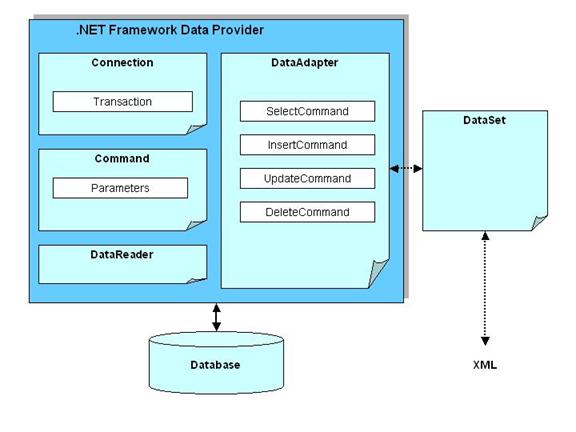
Figure 1:
Microsoft® ADO.NET Architecture
The Microsoft® .NET Framework Data Providers are components that have been explicitly designed for data manipulation and fast, forward-only, read-only
access to data. The Connection object provides connectivity to a data source.
The Command object enables access to database commands to return data, modify
data, run stored procedures, and send or retrieve parameter information. The
DataReader provides a high-performance stream of data from the data source.
Finally, the DataAdapter provides the bridge between the DataSet object and the
data source.
The DataSet component is provided by .NET
framework. It uses the DataAdapter object from the data provider to populate
its content and send changes back to data source.
Empress ADO.NET Data Provider Architecture
To utilize its own database as a data source, Empress
Software implements the .NET Framework data provider component. The .NET Framework
data provider enables connecting to a database, executing commands, and
retrieving results. It is defined in .NET framework as a set of interfaces and
classes.
Figure 2 below is an architecture view of Empress ADO.NET
data provider.
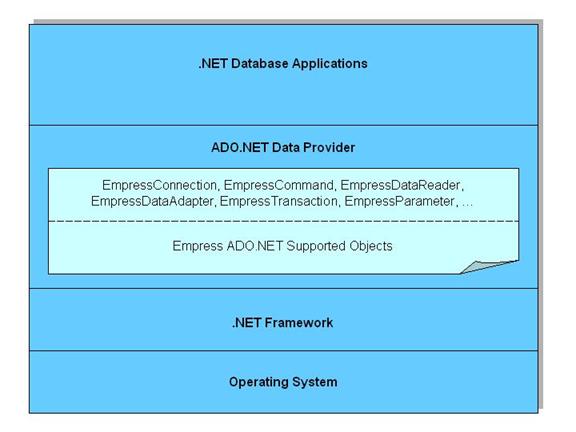
Figure 2: Empress
ADO.NET Data Provider Architecture
The EmpressConnection, EmpressCommand,
EmpressDataReader, EmpressDataAdapter, and other Empress objects are ADO.NET
objects implemented by Empress. They are used by .NET applications to establish
a connection to an Empress database, execute a SQL command, read results from a
query and execute other Empress database operations.
The Empress ADO.NET data provider supported
objects handle lower level communication with the Empress Connectivity Server.
They handle the Empress client /server protocol. In the case of Empress local
access, they utilize the Empress Database Engine via Empress Kernel Level MR
API.
Empress ADO.NET Data Provider Two Modes of Operation
Empress ADO.NET Data Provider works in two modes:
Client/Server and Local Access modes.
In the Client/Server mode, the data provider communicates
with Empress Connectivity Server directly through TCP/IP network, providing
.NET applications with database access to any platform including Windows XP,
Windows 7, and Windows CE on 32-bit and 64-bit architectures.
Figure 3 shows the Empress ADO.NET Data Provider in
Client/Server Mode.
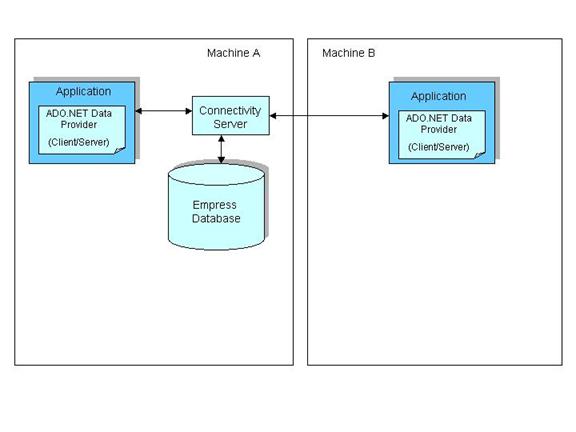
Figure 3:
Empress ADO.NET Data Provider in Client/Server Mode
If no server is required, the unique Empress Local Access
mode is ideal for embedded solutions and those applications that require high
performance local database access. In Local Access mode, Empress runs in
the same address space as the application, a valuable savings in size when
resource constraints are tight.
Figure 4 shows the Empress ADO.NET Data Provider in Local
Access Mode.
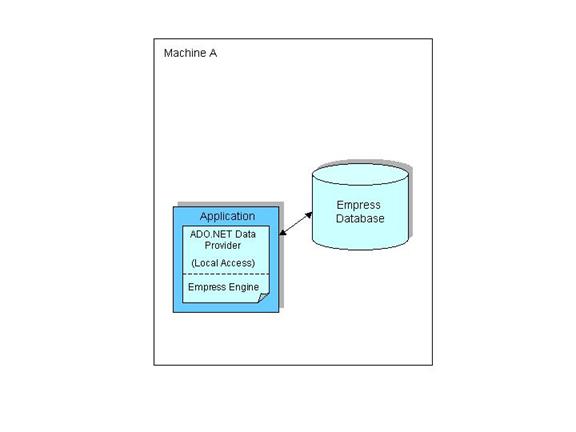
Figure 4:
Empress ADO.NET Data Provider in Local Access Mode
Empress is flexible enough to allow .NET applications to
simultaneously use the Empress ADO.NET Data Provider in Client Server and Local
Access modes.
Figure 5 shows the Empress ADO.NET Data Provider used
simultaneously in local access and client/server modes of operation.
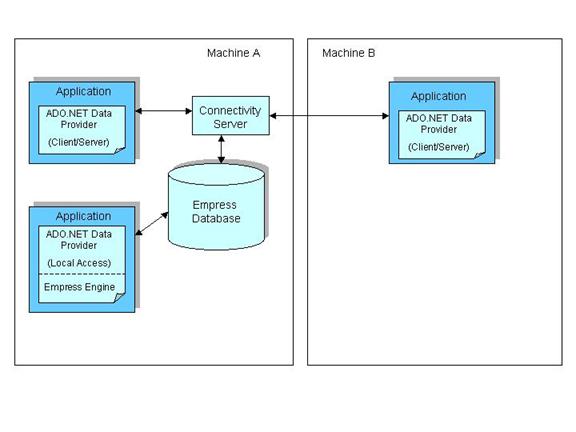
Figure 5: Empress ADO.NET Data Provider
in Local Access and Client/Server Modes of Operation
An Example
The following Empress ADO.NET example shows how to create an
Empress database from scratch and execute a sequence of SQL commands on the
newly created Empress database.
using System
using
System.Collections.Generic
using System.Linq
using System.Text
using System.Data
using
System.Data.Common
using
Empress.Data.EmpressProvider
namespace EmprssMakeDB
{
class EmpressMakeDB
{
static void Main(string[] args)
{
DbConnectionStringBuilder csb =
DbConnectionStringBuilder()
// Set current database to
"
-"
to tell database engine not
// to open any database
csb.ConnectionString = " Server=NONE database=- "
csb.Add(" User" ,
Environment.UserName)
EmpressLocalConnection localConnection =
EmpressLocalConnection()
localConnection.ConnectionString =
csb.ToString()
localConnection.Open()
EmpressCommand command = new
EmpressCommand()
command.Connection =
localConnection
try
{
// First try to remove
database
try
{
command.CommandText = " drop database
'new_db'"
command.ExecuteNonQuery()
}
catch (Exception e)
{
Console.WriteLine(e.Message)
}
// create new database
command.CommandText = " create
database 'new_db'"
command.ExecuteNonQuery()
//close the dummy
connection
localConnection.Close()
// make new connection
to the new database
csb.ConnectionString = " Server=NONE database=new_db "
csb.Add(" User" , Environment.UserName)
localConnection.ConnectionString
= csb.ToString()
localConnection.Open()
command.Connection =
localConnection
command.CommandText = " create table
table_1 (id int, memo text)"
command.ExecuteNonQuery()
command.CommandText = " insert
into
table_1 values (@id, @memo)"
EmpressParameter p1 = new
EmpressParameter("
@id"
)
command.Parameters.Add(p1)
EmpressParameter p2 = new
EmpressParameter("
@memo"
)
command.Parameters.Add(p2)
p1.Value = 1
p2.Value = " Hello"
command.ExecuteNonQuery()
p1.Value = 2
p2.Value = " local access
is cool and fast"
command.ExecuteNonQuery()
command.CommandText = " select * from
table_1"
EmpressDataReader rd =
command.ExecuteReader()
while (rd.Read())
{
Console.WriteLine(rd.GetInt32(0))
Console.WriteLine(rd.GetString(1))
}
}
catch (Exception e)
{
Console.WriteLine(e.Message)
}
localConnection.Close()
Console.Read()
}
}
}
ADO.NET Instead of Summary
- ADO.NET is a set
of classes that expose data access services to the .NET programmer.
- ADO.NET is an
integral part of the .NET Framework, providing access to relational, XML, and
application data.
- ADO.NET supports
a variety of development needs, including the creation of front-end database
clients and middle-tier business objects used by applications, tools,
languages, or Internet browsers.
- ADO.NET is the
most widely used API for .NET programmers to access relational databases.
- ADO.NET allows programming languages such as C++, C# or Visual Basic
to be
used for application development.
Empress ADO.NET Data Provider
Instead of Summary
- Empress ADO.NET
Data Provider brings the high performance Empress database to Windows
application developers.
- Empress
ADO.NET Data Provider fully supports the rich functionality of the Empress
database in the .NET framework.
- Empress ADO.NET Data
Provider is available in client/server mode and local access mode.
- Empress ADO.NET Data
Provider in Local Access mode doesn’t require any servers and is very suitable
for high performance embedded applications.
- Empress ADO.NET Data
Provider in Local Access mode runs in the same address space as the
application.
- Empress ADO.NET Data
Provider supports multiple languages via Unicode.
- Empress ADO.NET Data
Provider supports multiple platforms such as Windows XP, Windows
7 (32-bit and 64-bit architectures), Windows CE.
Empress Software Inc.
www.empress.com
|